Some tools only come out on big testing days. An optical power meter is not one of them. On a working fiber job it comes out every day — at the end of an installation, at the start of a maintenance visit, and whenever a customer reports a problem. It is the tool that answers the simplest and most important question on a link: is the light getting through, and how much of it?
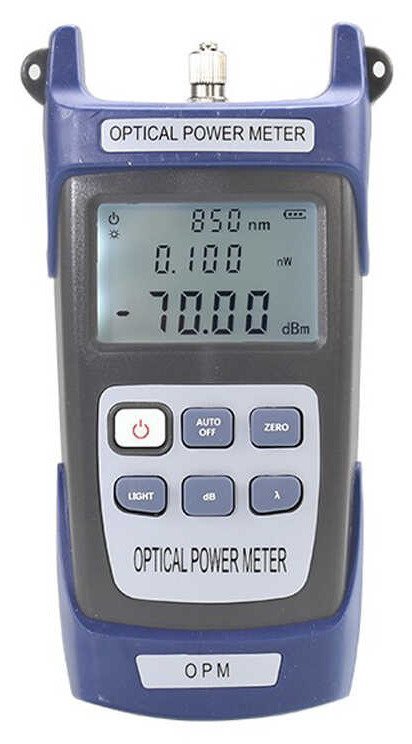
The K-527 optical power meter is a handheld meter for measuring optical power and link loss in fiber optic networks. Used together with a light source, it verifies fiber links quickly on site, with readings shown on a clear backlit display. It is a standard tool for FTTH installation, activation, and maintenance, and it also serves CATV and LAN fiber testing. What follows is how crews actually use a meter like this, day to day.
At Installation and Activation: Check Before You Hand Over
A newly finished drop is not finished until it has been tested. After termination, the crew connects the meter at one end and a light source at the other, and reads the result on the spot. A healthy reading means the link can be handed over with confidence. A weak or missing reading means something needs attention before the crew leaves — and it is far better to find that out now than after the customer has tried to use the service.
When a reading looks wrong, the meter turns guesswork into a short checklist. Is the connector clean and fully seated? Is there a tight bend or a pinched section in the drop? Was the right test setup used at both ends? Working through those points one by one usually finds the problem quickly, and each new reading confirms whether the fix worked. Testing at handover protects both sides: the customer gets a working service, and the crew does not get called back for a fault that was there from the start.
On Routine Maintenance: Compare With Last Time
Maintenance visits are where a power meter earns its keep quietly. A reading taken at the same point as before gives the crew something to compare against. If the value is much the same as last time, the link is holding up. If it has fallen noticeably, something has changed — often a dirty connector, a disturbed connection, or a section of fiber that has been moved or stressed since the last visit.
That comparison is the whole point of writing readings down. A single number on its own only says how the link is today; a series of numbers over time shows whether it is stable or slowly getting worse. Crews that keep a simple record for each route can spot a link that needs attention during a planned visit, instead of discovering it when it fails. It is a small habit, but it is what turns occasional testing into real network maintenance.
When a Fault Is Reported: Narrow It Down Before You Replace Anything
When a customer reports no service or poor service, the first job is to find where the problem sits. Testing at the accessible points along the route — at the customer end, at a distribution point, and at the feed — shows which sections are carrying light normally and which are not. That narrows the fault to one section instead of leaving the whole route under suspicion.
This is also where knowing what a meter does — and does not do — matters. A power meter tells you how much light arrives at the point you test; it does not measure the distance to a break the way an OTDR does. Used in the right way, though, it is usually enough to decide the next step: clean and reseat a connector, rework a section, or bring in further test equipment for a deeper look. Replacing equipment before testing is the expensive way round; a quick meter reading first saves parts, time, and repeat visits.
For more on reading the meter itself, see our guide on how to use an optical power meter. The habit is simple: test at installation, test on maintenance visits, and test before you replace anything. A handheld meter like the K-527 makes each of those checks quick enough to do every time, not just when something has already gone wrong. If your crews are testing FTTH, CATV, or LAN links, tell us what they work on and we will help you put together the right setup. Contact us through the quote form below or email silvia@licoom.com. EXW factory pricing on request.